
































































































Logo and naming rules for Earendil, Pi, Radius, and Lefos. For uses not covered here, email brand@earendil.com.
Names and relationship
Earendil is the company that builds Pi, Radius, and Lefos. Use the Earendil name and logo when referring to the company, and a product's name and logo when referring to that product.
Pi is Earendil's agent harness and coding agent, the harness you can make your own.
Radius is a set of hosted services crafted by Earendil for everyone who builds with Pi. It speaks the same language as Pi, so it can power, optimize, and extend your harness.
Lefos is Earendil's personal assistant.
Write the names as Earendil, Pi, Radius, and Lefos in prose.
Choosing a logo
- Symbol + wordmark (
logo-wordmark-horizontal/,logo-wordmark-vertical/): Use when the name needs to be visible. Choose vertical when horizontal does not fit. - Symbol (
logo/): Use for app icons, avatars, favicons, next to other brands' symbols, or where context identifies the brand.
Keep lockups intact. Do not separate the lettering, change proportions or typefaces, or create new lockups.
Choosing a file
Use SVG for screens, PNG where SVG is unsupported, and CMYK PDFs for print. Choose the coated or uncoated paper profile. White areas print as bare paper; on dark stock, print them with white ink.
Color and backgrounds
Choose on-light/ or on-dark/ to match the background, with enough contrast to keep the logo visible.
Use monochrome-on-light/ or monochrome-on-dark/ only when one color is required, such as single-ink printing, engraving, or a layout where all logos are monochrome.
Do not recolor logos. For solid backgrounds, use the brand's background color for that treatment and keep the clear space.
Clear space
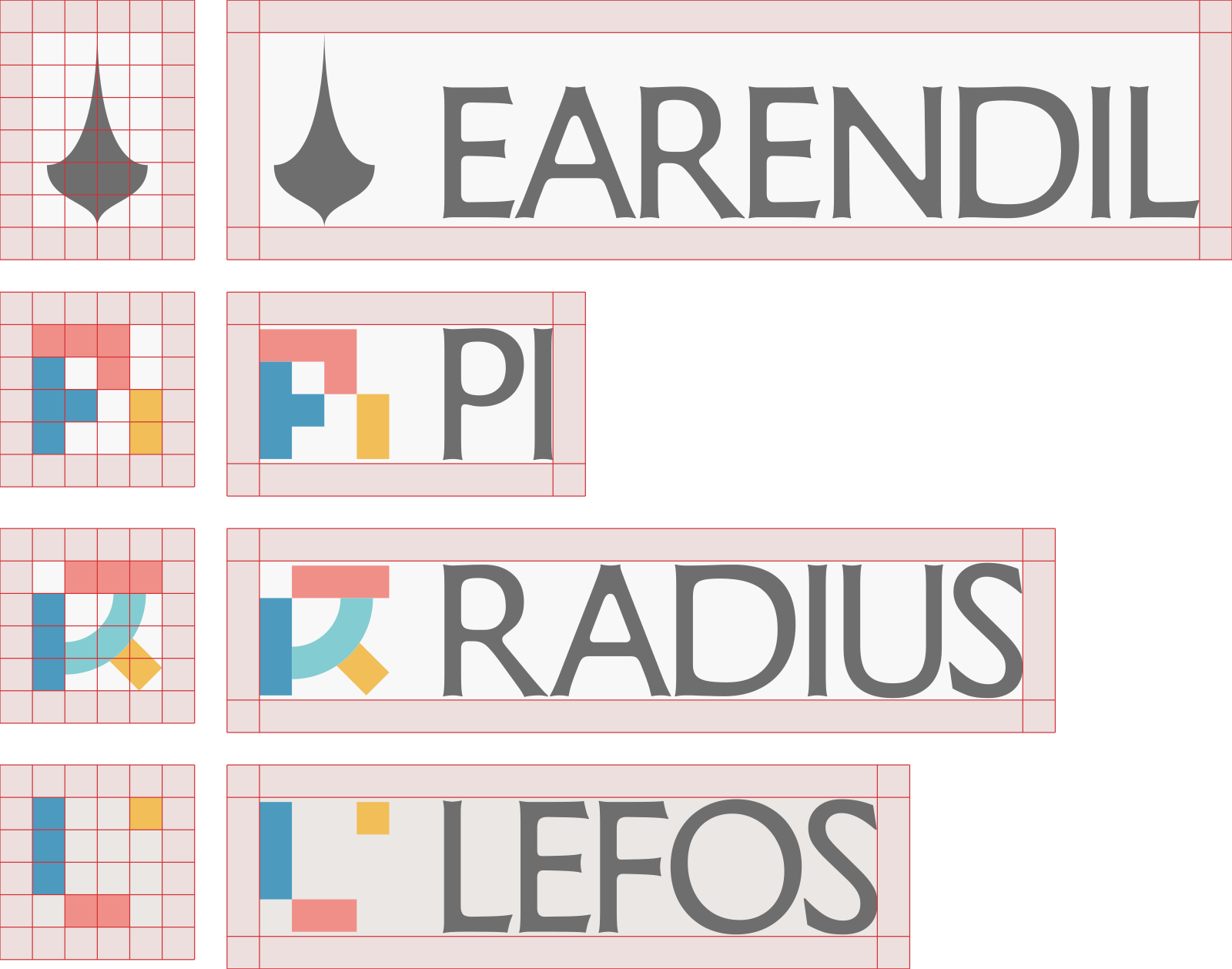
All symbol frames have the same width. One grid unit is one-quarter of that width.
Leave at least one grid unit around the entire asset, including the wordmark. At rendered height h, one grid unit is h × 140 ÷ the SVG viewBox height.
Size and integrity
Keep symbols recognizable and wordmarks legible. If a lockup is too small to read, use the symbol where context identifies it. Do not stretch, rotate, crop, add effects to, rearrange, or redraw the artwork.
Third-party use
You may use the names and unmodified supplied logos to accurately identify or discuss Earendil, Pi, Radius, and Lefos. Do not suggest sponsorship, endorsement, or an affiliation that does not exist; make your own brand clearly distinct. Do not incorporate our names or logos into the name or logo of your own product or organization.
For co-branding, merchandise, or any use that could imply an official relationship, contact brand@earendil.com before publishing. These guidelines do not change any rights you may have in software or other materials; permission to use software does not by itself grant permission to use a brand as your own.
Files in this kit
Each brand folder contains its logos as SVG and PNG.